San Andreas / Mods / Mods CLEO
WATER LEVEL
- DiezMod97 | subido por adiezmod97
- m.youtube.com/@DiezMod97
- 07/15/2026 (Última actualización: 11/12/2026)
- 2083 Descargas
Calificaciones:
Por favor, inicia sesión primero.
Favoritos:


Vídeos
Necesitas haber iniciado sesión para añadir vídeos a este mod.
Descripción
MOD FOR GTA SA PC:
HOW TO INSTALL MOD:
1. Folder (TSUNAMI) to folder Modloader GTA SA.
2. Requires Cleo+ 1.2.0 (or higher) version is required.
ABOUT MOD:
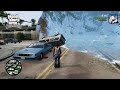
If you use this mod, you can increase the Water Level, Without changing the file (WATER.DAT) in your GTA SA.
You can also adjust the Water Wave Level.
Unlike typical TSUNAMI mods, NPC and Vehicles continue their activities even as the Water Level rises.
In this TSUNAMI mod, there are no living Pedestrians. You will see all NPC, along with their Vehicles, submerged in water.
In this (TSUNAMI) mod, I have limited the maximum water level to the height of a mountain (Mount Chiliad) Total water height is 525 meters.
The water level is around 100 or 200 meters, when you are in the front yard of CJ’s house, your monitor screen will go dark if the water level reaches 200 meters or higher.
You need to go to the tallest building, the Los Santos Tower.
HOW TO ENABLE MOD IN GAME:
1. PRESS CHEAT CODE: (WATER) For Mod on and Select Water Level.
- After you have selected the water level, When the Water Rises, or a TSUNAMI.
2. PRESS NUM LOCK ON (-/+) On Keyboard, To set Water Wave. (Max WATER WAVE LEVEL 10)
3. PRESS NUMBER (2) On Keyboard, For Disabled/Enabled Player Swiming.
- This means you are free to walk in the water.
4. PRESS CHEAT CODE: (WATER) Again For Set Water Level or Backup Water (Water.dat) in Menu select.
CS Script Mods By. DiezMod97
Happy Enjoy :)
YouTube: DiezMod97
Comentarios
Ya se han publicado 1 comentarios.